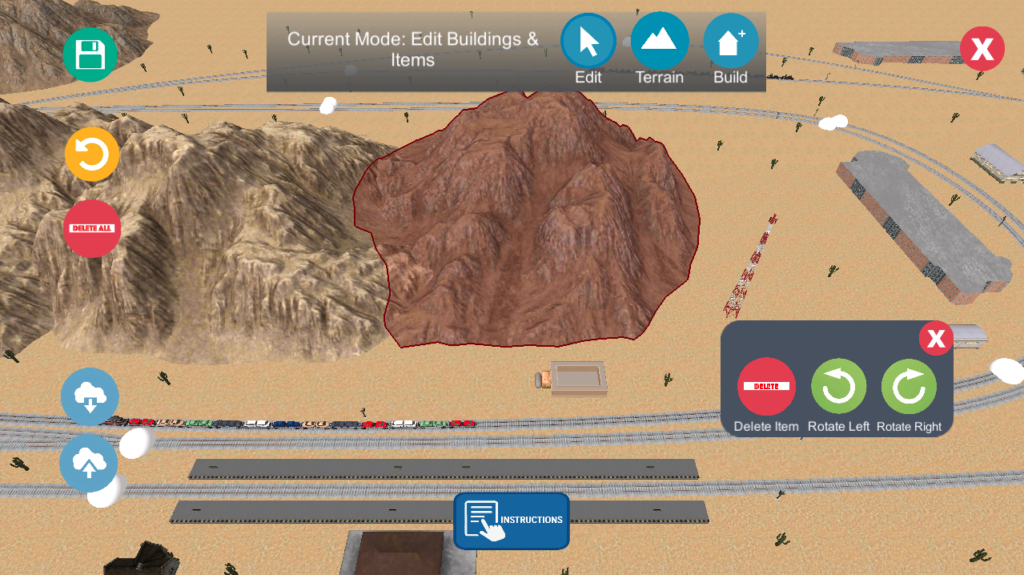
I’ve been working on some major improvements to Train Sim’s Creative Mode to make building faster, safer, and more intuitive. Here’s what’s new.
A New Mode System
The editor now has three distinct modes, each designed to remove friction from the building process:
Build Mode
Place new buildings and items without disturbing anything you’ve already placed. Existing objects are locked, so you won’t accidentally drag them while building. This was one of the most requested improvements from players.
Edit Mode
Select and modify existing objects. Tap an object to move it, rotate it, or delete it. A contextual panel appears on selection, giving you quick access to all editing tools.
Terrain Mode
Sculpt the terrain by raising or lowering the ground. The active tool is clearly highlighted, so you always know what effect you’re applying.
A label at the top of the screen shows the current mode, and the active mode button is highlighted for clarity.
Object Editing Improvements
Editing placed objects is now significantly more flexible:
- Rotate objects
Rotate any object clockwise or counter-clockwise. No more rebuilding something just because it’s facing the wrong direction. - Delete individual objects
Remove exactly what you want. Previously, your only options were undoing the last action or clearing everything. - Reliable touch controls
Objects now move only when you intentionally drag them. A quick tap selects instead of moving.
Improved Undo System
Undo has been completely rebuilt to be more reliable and scalable:
- Undo object movement
Moving an object can now be undone precisely. Implementing this revealed a subtle issue with Unity’s event ordering. Depending on timing, either the input event or the update loop could fire first, which sometimes caused undo to delete objects instead of restoring them. - Unlimited history
The old system used a fixed array of 10 slots and manually shifted entries. It’s now backed by a dynamic list, allowing for unlimited undo history.
This also fixed a bug where undoing the only placed object removed it visually but left behind invalid data in the save file.
Grid Snapping
Objects now snap to a grid by default when placing, making it easier to create clean, organized layouts.
Better Sharing
Shared Creative Mode levels now include terrain textures. If you build a desert, it will look like a desert when someone imports it.
This required adding new data to the share format while maintaining backwards compatibility. Older share codes still load correctly, just without texture information.
A Note on Mobile Touch
One of the more subtle bugs involved UI input “passing through” to the game. Tapping a button, like rotate, would also trigger a world interaction underneath it.
Unity’s standard fix works with a mouse but not reliably with touch input unless you pass the correct finger ID. On the frame where the finger lifts, that data can disappear entirely. This has been addressed and should work much better.
Try It Now
These improvements are available in the Train Sim Open Beta.
https://play.google.com/apps/testing/com.ogien.trainsim
Your feedback helps make Train Sim better for everyone!